top of page
Usability Testing: Add-on Explorer of MathWorks
Project Goal
Project Goal
Project Goal
Carry out a usability study examining how users interact with the product (especially the categorization panel)
Carry out a usability study examining how users interact with the product (especially the categorization panel)
Carry out a usability study examining how users interact with the product (especially the categorization panel)


Challenges, Actions, Results
Usability Testing
Add-on Explorer for MathWorks
Scope
Group Project, 4 people
Roles
Participant recruiter, Moderating guide creator, Moderator, Result Analyst, Presenter
Skills
Heuristic Evaluations, Expert Review, Usability Test, Moderating, Note Taking
Tools
MS Office Power Point, Zoom, Google Form

II. Research Goals
We are tasked to assess the overall usability of the MathWorks Add-On Explorer.
Insights gained from this expert review are used to guide task creation for subsequent usability testing.
III. Expert Review and Heuristic Evaluations
The expert review was conducted using Nielsen’s 10 Usability Heuristics for User Interface Design.
These heuristics were utilized in order to identify usability issues, assess their severity, and provide recommendations to improve the user experience.
Nielsen’s 10 Usability Heuristics
-
Visibility of system status
-
Match between system and real world
-
User control and freedom
-
Consistency and standards
-
Error prevention
-
Recognition rather than recall
-
Flexibility and efficiency of use
-
Aesthetic and minimalist design
-
Help users recognize, diagnose, and recover from errors
-
Help and documentation
IV. Participants Recruiting & Usability Testing
I created the moderator guide, recruited participants, and conducted the usability test. The usability test is conducted through zoom online.
Based on the participants' feedback and performance, as well as their System Usability Survey (SUS) score, we got more findings with recommendations to the product.
V. Findings & Recommendations
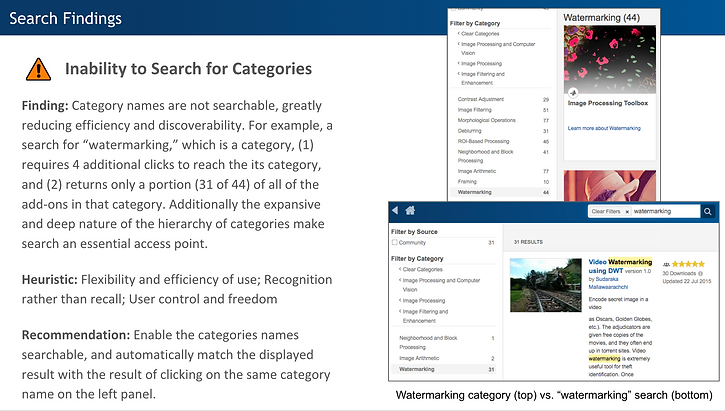
We found 13 general findings about Home & Detail Pages, 7 Filter & Category findings, and 5 findings about the Search Function.
We labeled the finding with different levels according to their severity and we provide some recommendations for each finding. and the following are the examples of the findings from the report.


My Reflection
The Add-on Explorer is a feature embedded in the Matlab software. However, since the Matlab is a software that we have to purchase, our sponsor gave us the Add-on Explorer Website to use which has the same display and function.
-
We used the Add-on Explorer Website to do the expert review and generated the moderator guide. Besides, we conducted the usability studies with participants online. To keep everything consistency and ensure the process going smoothly, we decided to let the participants use the Add-on Explorer Website to complete the usability study.
-
We have found many findings related to the button and layout design, but to keep our findings relevant to our goal (categorization bar), we deleted these findings in our final presentation.
Things We Could Do Better Next Time:
-
I would ask someone who has Matlab to show me how the Add-on Explorer is embedded in Matlab and see if there is any display or function difference exists between the webpage and the feature window displayed in Matlab.
-
As the users all have Matlab, I would suggest the usability tests should be conducted when they use the Matlab Add-on Explorer instead of open the Add-on explorer Webpage. Therefore, we could see how users interact with the product in the real situations.
-
I would suggest to conduct at least one usability study in person with participants, so that we can observe how he/she interact with the product. We might also find some user's habits, needs or pain points that we would not be able to find through online test.
-
As for the findings that are not related to the goal but still in a server level, I would suggest we still put them into the report or presentation (appendix or a separate session). Because as a researcher, the goal is to help business grow instead of finishing only a task. We should at least notify the company that there are some issues that should be paid attention on, even it is not really related to the task goal.
bottom of page